Monday, August 22, 2016

Apache Fortress: The easiest way to get full Role-based Access Control in Openstack Keystone

Role-based access control is not a generic term!

Role-Based Access Control was introduced as a formal model by David Ferraiolo and Richard Kuhn almost 25 years ago.
A role based access control (RBAC) policy bases access control decisions on the functions a user is allowed to perform within an organization. The users can not pass access permissions on to other users at their discretion.
Ten years later the same authors proposed RBAC as a formal standard in this paper with functional specs in Z-notation.
In 2004 the RBAC formal model was adopted by ANSI as a specification - INCITS 359.
RBAC model four components:
  1. Core RBAC
  2. Hierarchical RBAC
  3. Static Separation of Duty Relations
  4. Dynamic Separation of Duty Relations
Core RBAC includes sets of five basic data elements called users (USERS), roles (ROLES), objects (OBS), operations (OPS), and permissions (PRMS).
The RBAC model as a whole is fundamentally defined in terms of individual users being assigned to roles and permissions being assigned to roles. As such, a role is a means for naming many-to-many relationships among individual users and permissions. In addition, the core RBAC model includes a set of sessions (SESSIONS) where each session is a mapping between a user and an activated subset of roles that are assigned to the user.
So, ANSI RBAC Object Model has six basic elements:
  1. User – human or machine entity
  2. Role – a job function within an organization
  3. Object – maps to system resources
  4. Operation – executable image of program
  5. Permission – approval to perform an Operation on one or more Objects
  6. Session – contains set of activated roles for User


Tuesday, June 21, 2016

How to make screencast on Ubuntu 14.04

There is a lot of software for screencasting, subtitles making and video mastering for Ubuntu and you can create awesome demo with a lot of effects.
But what if you want to create a simple demo by using only free software?
Unfortunately I could not find a one application for Linux to screencast, create subtitles and add subtitles to the video. I had to use 4 different applications.
So I'm going to tell you how to:
  • Create screencast video
  • Create subtitles with the custom style
  • Add subtitles to the video

Monday, June 20, 2016

Apache Fortress instead of policy.json in Openstack Keystone

Openstack uses json file (policy.json) to set rules for Role Based Access Control. But this approach is not very elegant and has several problems.
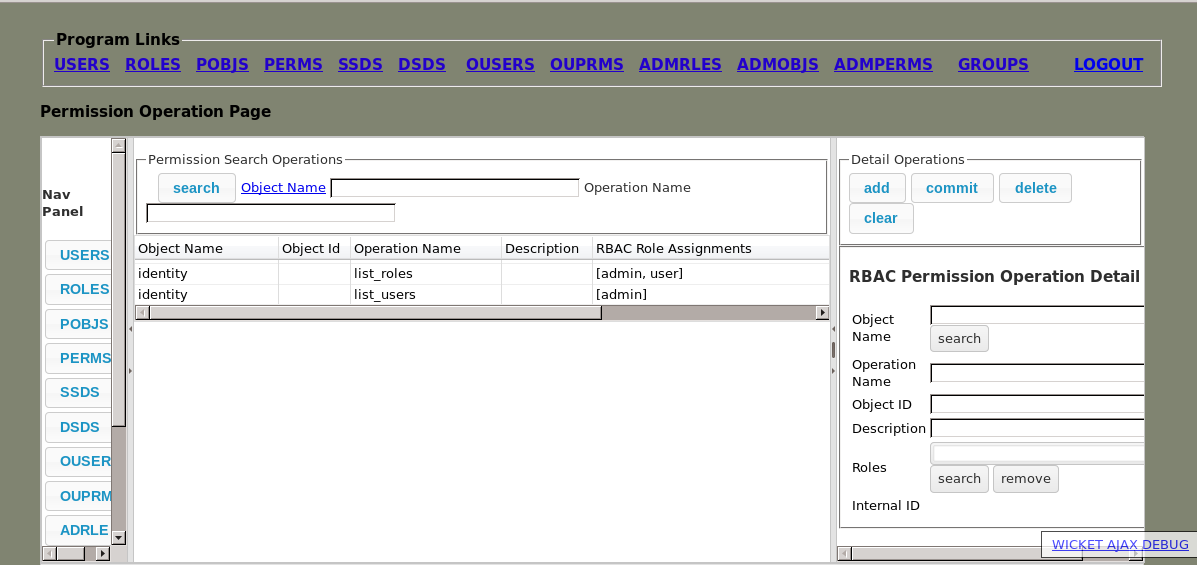
Let's take a look how we can replace policy.json by Apache Fortress - access management system based on ANSI Role-Based Access Control (INCITS 359) standard. Apache Fortress stores rules in OpenLDAP or ActiveDirectory and has a nice Web interface:


Monday, May 23, 2016

Kerberos and Keystone: How to integrate Kerberos with OpenLDAP backend in OpenStack Keystone

Kerberos is a network authentication protocol. It is designed to provide strong authentication for client/server applications by using secret-key cryptography.
This post describes how to set up OpenStack Keystone with external authentication - Kerberos with OpenLDAP backend. The post also contains results of the research about using Kerberos not just for authentication but also for authorization by storing additional data (like groups, roles, etc.) in Kerberos ticket.
This post describes how to set up following configuration:


Friday, May 20, 2016

Keystone and WebSSO: Using Active Directory Federation Services with OpenStack Keystone

In this post we walk the reader through the following configuration:
  •     Keystone as Service Provider (with Shibboleth Apache Module)
  •     AD FS as Identity Provider
  •     Active Directory as storage for users

adfs.png


Friday, February 26, 2016

Keystone and WebSSO: Using Shibboleth Identity Provider and OpenLDAP with OpenStack Keystone

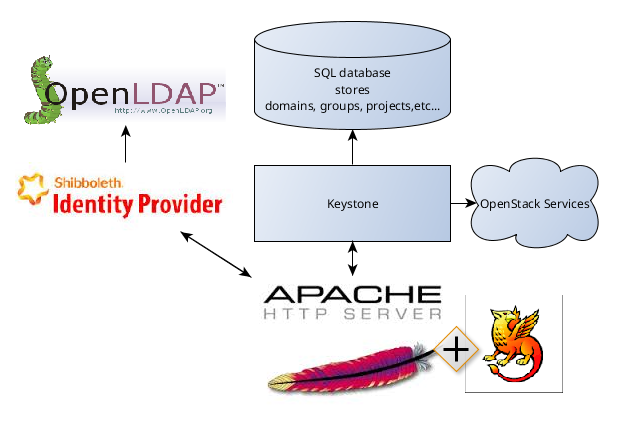
 This post describes how to set up Web-based Single Sign-On system consisting of OpenStack Keystone, Shibboleth Identity Provider and OpenStack Horizon.
Instruction covered the following configuration: Keystone and Horizon under Apache Web Server with Shibboleth module as Service provider plus Shibboleth Identity Provider as Identity Provider. This configuration is based on SAML v2.0 specifications.
Shibboleth Identity Provider can be easily replaced with any other Identity Provider based on SAML. This fact makes the document usable for other configurations.
Although post describes one specific case it may be useful also for any other configuration of SSO with Keystone because instruction can be used not entirely but in part. This post also contains brief information about Security Assertion Markup Language (SAML) and gives common understanding of Keystone SSO system.


Monday, February 15, 2016

Keystone and SSO: Keystone to Keystone configuration (ECP profile)


This post describes how to set up Single Sign-On system based on ECP profile of SAML standard.
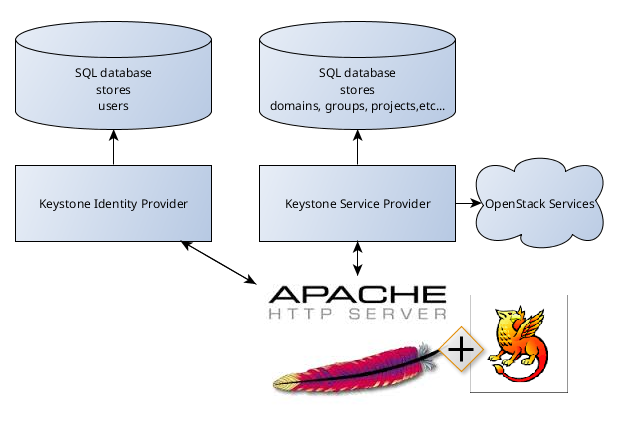
Keystone can be Identity Provider as well as Service Provider. In production environment it means that user can have one Keystone for authentication and general authorization and other as for specific authorization.
We will have following configuration: